

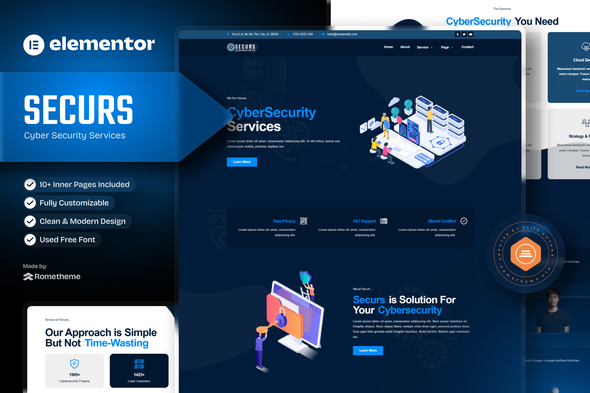
Securs – Cyber Security Service Elementor Template Kit

Version Download:
Original price was: $29.00.$5.00Current price is: $5.00.
Meet, Securs specially designed for Cyber security services Website!. The template kit comes with an ideal selection of templates cyber, technology, cybercrime, protection, guard, shield and any business services. This kit has a modern and unique design with a 100% fully responsive layout, easy installation, and easy customization because using Elementor you don’t need a single line of coding! Save your time.
This Template Kit contains page content for creating Elementor pages. This kit has been optimized for use with the free “Hello Elementor” theme.
Features :
- Compatible with WordPress – Elementor
- Using Free Plugins (Elementor Pro is not required)
- True no-code customization with drag and drop
- 100% Fully Responsive & mobile-friendly
- Modern and Professional design
- 12+ pre-built templates ready to use
- Customize fonts and colors in one place (Global Theme Kit Style)
Templates in Zip :
- Homepage
- About Us
- Services
- Service Detail
- Our Team
- Testimonial
- Pricing Plan
- FAQ
- 404
- Contact Us
- Header
- Footer
Required Plugins :
- ElementsKit
- RomethemeForm
- Custom Icons for Elementor
How to Use Template Kits:“This is not a WordPress Theme. Template kits contain the design data for Elementor only and are installed using the Envato Elements plugin for WordPress or directly through Elementor.”
- Install and Activate the “Envato Elements” plugin from Plugins > Add New in WordPress.
- Go to Elements > Installed Kits and click the Upload Template Kit button. You may also import automatically by clicking Connect Account to link your Elements subscription, then import under Elements > Template Kits.
- Check for the orange banner at the top and click Install Requirements to load any plugins the kit uses.
- Click import on the Global Kit Styles first.
- Click Import on one template at a time. These are stored in Elementor under Templates > Saved Templates.
- Go to Pages and create a new page and click Edit with Elementor
- Click the gear icon at lower-left of the builder to view page settings and choose Elementor Full Width and hide the page title.
- Click the gray folder icon to access My Templates tab and then Import the page you’d like to customize.
- Before making a purchase, please read the Terms and Conditions on this page: Terms & Conditions
- If you have any questions, please first read the FAQ on this page: FAQ
- If you haven’t found the answer to your question, please contact us by e-mail codingshop20@yahoo.com or create ticket.
- Please note that any digital products presented on the website do not contain malicious code, viruses or advertising. You buy the original files from the developers. We do not sell any products downloaded from other sites.
- we have not responsible for support users. if you need support, you can buy products directly from envato.
- Note that we can NOT provide purchase code for you. all products is Non-Licensed.
- we can NOT support free updates for you. download links available until 30 days after purchase.
- You can download the product after the purchase by a direct link on your account page in the downloads section.
Related Products

TopDeal – Multi Vendor Marketplace Elementor WooCommerce WordPress Theme (Mobile Layouts Ready)

Cera – Intranet Community Theme
