

NutriAI – AI Meal Planner Flutter App

Version Download:
Original price was: $14.00.$2.00Current price is: $2.00.
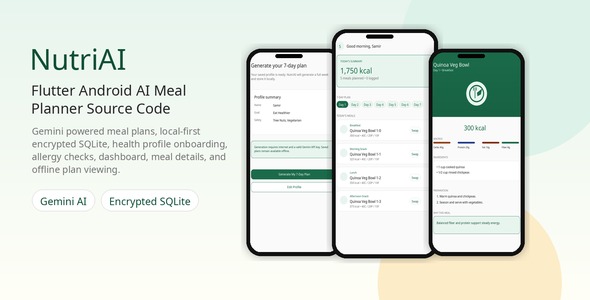
NutriAI is a production-ready Flutter app for AI-assisted meal planning with Android release verification. The person operating an installed copy enters their own Gemini API key, completes a health profile, generates a seven-day meal plan, and manages saved meals locally on the device. The iOS source project is included, but the iOS release build was not verified in this QA pass.
Feature Grid
- Gemini BYOK setup: In-app setup for a per-device Gemini API key, stored with platform secure storage.
- Health profile onboarding: Validated fields for goal, body metrics, activity level, allergies, dietary preferences, and medical considerations.
- Seven-day AI meal plan: Structured Gemini prompts and JSON parsing produce breakfast, lunch, dinner, and snack plans.
- Local persistence: Drift and SQLite store profiles, generated plans, meal actions, and local generation guard counters.
- Resilience controls: Graceful handling for invalid API keys, offline requests, malformed AI responses, quota limits, and safety blocks.
- Buyer customization: Branding, package name, app name, icon, theme color, localization, and release signing guides are documented.
Technical Stack
- Flutter and Dart
- Gemini REST API integration
- Drift and SQLite local database
- Flutter secure storage for the Gemini key and local database passphrase
- Feature-first source structure
- Offline HTML documentation
Platform Verification
- Android release App Bundle build was verified for this package.
- iOS source project is included for buyer customization and signing in Xcode.
- iOS release build was not verified in this QA pass, so iOS is not claimed as a verified release platform.
AI Setup Note
NutriAI uses a per-device bring-your-own-key model. No real Gemini key is included in the package. The person operating an installed copy must create a Gemini API key in Google AI Studio, restrict it appropriately, and enter it in the app setup flow. For consumer distribution where app users should not bring Gemini keys, the buyer should add a secure backend/proxy before release. Gemini usage is billed to the Google account that owns the entered key.
Buyer Requirements
- Flutter SDK through FVM or a compatible local Flutter installation
- Android Studio and a configured Android SDK
- Gemini API key from Google AI Studio
- Android signing keystore for store release builds
- Mac with Xcode and Apple Developer account only if you choose to build and verify the included iOS source project
- Before making a purchase, please read the Terms and Conditions on this page: Terms & Conditions
- If you have any questions, please first read the FAQ on this page: FAQ
- If you haven’t found the answer to your question, please contact us by e-mail codingshop20@yahoo.com or create ticket.
- Please note that any digital products presented on the website do not contain malicious code, viruses or advertising. You buy the original files from the developers. We do not sell any products downloaded from other sites.
- we have not responsible for support users. if you need support, you can buy products directly from envato.
- Note that we can NOT provide purchase code for you. all products is Non-Licensed.
- we can NOT support free updates for you. download links available until 30 days after purchase.
- You can download the product after the purchase by a direct link on your account page in the downloads section.
Related Products

DesignoLearn: Full-stack React Native Learning App! (New)

Quizzes App Template – Android & iOS
