

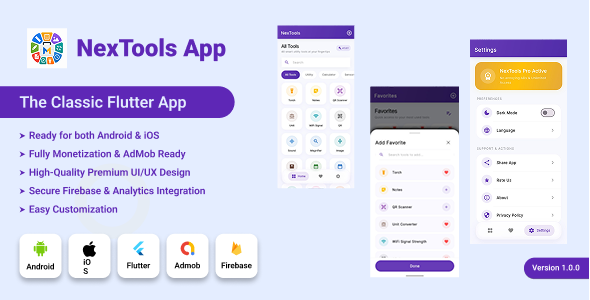
NexTools | 48-in-1 Utility and Multi-Tool Flutter App with AdMob and In-App Purchases

Version Download:
Original price was: $15.00.$3.00Current price is: $3.00.
Monetized with AdMob (Banner, Interstitial, App Open) and In-App Purchases (Monthly, Yearly, Lifetime)
Built with Flutter 3.41.8 • GetX Architecture • Android and iOS Ready
NexTools is a complete, feature-rich 48-in-1 multi-utility toolkit application built with Flutter. It is designed as a go-to daily companion offering a massive collection of essential tools, smart calculators, offline converters, and hardware sensor interfaces — all packed into a single polished app.
With a sleek glassmorphic dark-purple UI, responsive grid layout, smooth micro-animations, and a fully integrated monetization engine, NexTools is production-ready for the Google Play Store and Apple App Store from day one.
Key Features
- 48 Tools in 1 App: Replaces 48 individual apps — saves device storage and provides unmatched convenience for everyday users.
- Triple AdMob Monetization: Banner, Interstitial (every 4th click), and App Open ads — fully policy-compliant with an overlap guard that blocks back-to-back full-screen ads.
- 3-Tier In-App Purchases: Monthly, Yearly, and Lifetime premium plans. Purchasing instantly and permanently disables all ads system-wide.
- Dark and Light Mode: Smooth dynamic theme switching powered by a centralized AppTheme system.
- Multi-Language Support: 7 built-in languages — English, Spanish, Hindi, Chinese, Arabic, French, and Urdu with full RTL layout support.
- Dynamic Search and Categories: Instant search across all 48 tools with filterable category chips on the home screen.
- Favorites System: Users can pin their most-used tools for quick one-tap access.
- Clean GetX Architecture: Strict MVC pattern, zero analyzer errors, and a fully modular, easy-to-customize codebase.
48 Tools — Full Category Overview
| Core Utilities | Smart Calculators | Sensors and Hardware | Media and Conversion |
|---|---|---|---|
| Quick Notes and Memo | BMI and Health Index | Digital Compass | QR Code Scanner |
| Speech-to-Text | Age Calculator | Step Counter (Pedometer) | QR Code Generator |
| Wi-Fi Signal Strength | Date Difference Calculator | Ambient Light Meter | Image Compressor |
| Voice Recorder | Fuel Cost Calculator | Battery Health Monitor | Image Format Converter |
| Text-to-Speech | Tip Calculator | Sound Level Detector | Unit Converter |
| Cryptography Tool | Discount Calculator | Metal Detector | Number Base Converter |
| Morse Code Converter | Leap Year Checker | Bubble Leveler | Hex to RGB Converter |
| Countdown Timer | Temperature Converter | Magnifier (Camera Zoom) | PDF Converter |
| Stopwatch | Car Loan Calculator | Speedometer (GPS) | App Extractor |
| Pendulum Simulator | Random Number Generator | Ruler and Measurement | Calendar and Date Planner |
| Plus Flashlight, Screen Brightness Control, Sound Generator, and more. |
Monetization System Details
- Google AdMob (3 Ad Formats):
- Banner Ad anchored at the footer of the Settings screen.
- Interstitial Ad displayed on every 4th tool launch (frequency-capped for high user retention).
- App Open Ad on cold start and background-to-foreground resume, with a guard that prevents overlap with Interstitial.
- In-App Purchases (3 Tiers):
- Monthly Subscription — recurring monthly billing.
- Yearly Subscription — discounted annual billing.
- Lifetime Upgrade — one-time purchase for permanent ad-free access.
- Automatic Ad-Free Mode: Upon any purchase, all Banner, Interstitial, and App Open ads are instantly disposed and permanently disabled for that session and all future sessions.
Technical Specifications
- Framework: Flutter 3.41.8 — Dart 3.11.5
- State Management: GetX (Reactive State, Routing, and Dependency Injection)
- Minimum Android SDK: API 21 (Android 5.0 Lollipop and above)
- Target Android SDK: API 36 (latest Google Play Store requirement)
- iOS Deployment Target: iOS 14.0 and above
- Java Compatibility: JDK 17 fully configured in build.gradle.kts
- Release Signing: Pre-configured key.properties and placeholder keystore for instant signed APK and AAB builds.
- Responsive Layout: ScreenUtil design reference size 390×844 (iPhone 14 Pro) — auto-scales on all screen sizes.
What is Included in the Package?
- Complete Flutter Source Code (Android and iOS fully configured).
- Pre-configured Android Release Signing setup (key.properties and build.gradle.kts).
- Full HTML Documentation covering: package renaming, AdMob setup, billing configuration, iOS build guide, troubleshooting FAQ, packaging guide, and full changelog.
- 5-Minute Quick Start Guide (separate HTML file).
- Before making a purchase, please read the Terms and Conditions on this page: Terms & Conditions
- If you have any questions, please first read the FAQ on this page: FAQ
- If you haven’t found the answer to your question, please contact us by e-mail codingshop20@yahoo.com or create ticket.
- Please note that any digital products presented on the website do not contain malicious code, viruses or advertising. You buy the original files from the developers. We do not sell any products downloaded from other sites.
- we have not responsible for support users. if you need support, you can buy products directly from envato.
- Note that we can NOT provide purchase code for you. all products is Non-Licensed.
- we can NOT support free updates for you. download links available until 30 days after purchase.
- You can download the product after the purchase by a direct link on your account page in the downloads section.
Related Products

Foodiee React Native Restaurant Theme/Templates

Quizzes App Template – Android & iOS
