

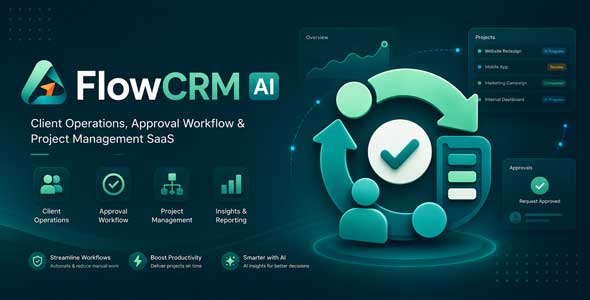
FlowCRM AI – Client Operations, Approval Workflow Project Management SaaS

Version Download:
Original price was: $49.00.$7.00Current price is: $7.00.
FlowCRM AI is a modern SaaS platform built for agencies, service businesses, consultants, studios, freelancers, and client delivery teams that need one organized system to manage clients, projects, approvals, feedback, files, reports, requests, and delivery workflows.
It brings together client workspaces, stakeholders, client portals, projects, tasks, deliverables, approval workflows, asset reviews, client requests, shared files, reports, exports, team collaboration, roles, permissions, automation, AI assistance, and SaaS plan management into one complete client operations platform.
With FlowCRM AI, businesses can create a professional client-facing experience where clients submit requests, review work, approve deliverables, download files, follow project progress, and access reports without relying on scattered emails, chat messages, spreadsheets, or disconnected tools.
Why Choose FlowCRM AI?
- All-in-one client operations SaaS: Manage clients, stakeholders, projects, tasks, deliverables, approvals, reviews, files, reports, exports, and team workflows from one platform.
- Client Portal: Give clients a clean workspace to view progress, submit requests, review assets, approve work, download files, and read reports.
- Project Management: Organize client work with projects, delivery timelines, tasks, milestones, priorities, statuses, and progress tracking.
- Approval Workflow: Collect client decisions, revision requests, approval notes, partial approvals, and review holds in a structured approval queue.
- Asset Reviews: Share creative assets, collect comments, manage feedback, and keep review history organized.
- Client Requests: Let clients submit revisions, campaign requests, file requests, or general work requests with priority, deadline, and context.
- Shared Files: Provide a centralized file library for final assets, reports, documents, images, archives, and downloadable handoff resources.
- Reports & Exports: Share progress reports, delivery summaries, PDF exports, ZIP handoff packages, and workspace snapshots.
- AI Operations: Use AI-assisted summaries, next actions, operational signals, client updates, report assistance, and workflow recommendations.
- SaaS-ready: Includes users, plans, limits, admin controls, monetization options, team workspaces, and role-based access.
Client Workspaces
Create dedicated client workspaces that act as the central hub for projects, stakeholders, portals, approvals, deliverables, files, requests, and reports.
- Create and manage multiple client workspaces
- Store client name, industry, email, phone, website, and timezone
- Track workspace status and delivery health
- Manage stakeholders and client contacts
- View project activity and progress
- Monitor portal setup status
- Access organization-level reports and summaries
Stakeholders & Client Contacts
Manage reviewers, approvers, decision makers, and client contacts from one structured directory.
- Add stakeholder and client contact records
- Assign roles, permissions, and workspace access
- Control approval, comment, upload, and download permissions
- Invite stakeholders by email
- Support magic link access
- Track stakeholder activity and engagement
Client Portals
FlowCRM AI includes a client-facing portal where stakeholders can access project updates, submit requests, review work, approve deliverables, download files, and read reports.
- Client portal login
- Invite acceptance flow
- Password setup for stakeholders
- Workspace overview
- Delivery timeline
- Client request submission
- Approval queue
- Asset review workspace
- Shared file library
- Client reports and handoff packages
Projects & Tasks
Create projects and tasks to manage client delivery, internal execution, client-facing progress, timelines, milestones, deliverables, and approvals.
- Create client projects
- Set status, priority, start date, and due date
- Assign tasks to team members
- Track project and task progress
- Connect tasks to delivery workflows
- Show client-visible project progress
- Maintain project activity history
Deliverables
Manage the work your team prepares for clients, including design drafts, campaign assets, reports, files, and final delivery packages.
- Create deliverables for client projects
- Track deliverable status and review status
- Add version labels and due dates
- Attach files and assets
- Connect deliverables to reviews and approvals
- Provide downloadable handoff files
Approvals
Collect client decisions in a structured approval queue so teams can move work forward without losing approval history.
- Create approval requests
- Approve deliverables
- Approve with notes
- Request revisions
- Reject or partially approve work
- Track due dates and approval notes
- Connect approvals to projects and deliverables
Asset Reviews
Share creative work with clients and collect feedback in a structured review workspace.
- Create asset review items
- Collect client comments and replies
- Track review status
- Manage feedback threads
- Connect reviews to approvals and deliverables
- Keep review history organized
Client Requests
Let clients submit structured requests instead of sending scattered messages across email, chat, or social apps.
- Submit general requests
- Submit revision requests
- Submit campaign or asset requests
- Add priority, details, and needed-by date
- Connect requests to projects
- Track request status and response history
Shared Files
FlowCRM AI includes a centralized file library where clients can browse, preview, and download shared assets.
- Client-visible file library
- Support images, documents, videos, archives, and resources
- File previews and file type icons
- Project and deliverable metadata
- Version labels
- Download actions
- Before making a purchase, please read the Terms and Conditions on this page: Terms & Conditions
- If you have any questions, please first read the FAQ on this page: FAQ
- If you haven’t found the answer to your question, please contact us by e-mail codingshop20@yahoo.com or create ticket.
- Please note that any digital products presented on the website do not contain malicious code, viruses or advertising. You buy the original files from the developers. We do not sell any products downloaded from other sites.
- we have not responsible for support users. if you need support, you can buy products directly from envato.
- Note that we can NOT provide purchase code for you. all products is Non-Licensed.
- we can NOT support free updates for you. download links available until 30 days after purchase.
- You can download the product after the purchase by a direct link on your account page in the downloads section.
Related Products
JAAS (Jitsi as a Service or 8×8) Integration for RISE CRM

Charitio – Crowdfunding Platform
