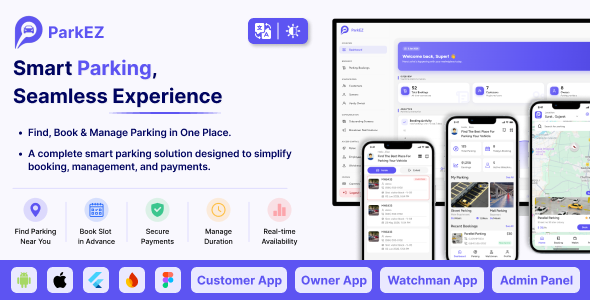
ParkEz | Flutter Smart Parking Booking and Management App With Admin Panel

Version Download:
Original price was: $61.00.$9.00Current price is: $9.00.
Smart Parking System | Car Parking Booking & Reservation App | Flutter Full App (Customer, Owner, Watchman) with Web Admin Panel
ParkEz is a complete, ready-to-launch smart parking platform built with Flutter. Drivers find and reserve a space in seconds, parking owners run their facilities and revenue from their phone, gate staff verify vehicles with one QR scan, and you oversee the whole operation from a powerful web admin panel.
One purchase — six products: Customer App, Owner App, Watchman App, Web Admin Panel, a ready-made marketing Landing Page, and full documentation. All apps share one clean Flutter + GetX codebase and run on a Firebase backend with real-time sync — no separate server to build or maintain.
ParkEz suits shopping malls, airports, hospitals, hotels, corporate campuses, universities, residential communities, event venues, and municipal smart-city projects.
Please note: ParkEz uses Firebase and Google Maps Platform, which are external Google services that may incur additional costs depending on your usage, and integrates third-party payment gateways that may require their own merchant accounts and involve external per-transaction fees. These costs are not included in the item price — see the “Important: Third-Party Service Costs” section below for details.
The Problem ParkEz Solves
Parking run on paper tickets and cash loses money in ways that are hard to see. Queues build at the gate, staff make mistakes under pressure, cash goes uncounted, and drivers circle a full lot with no way of knowing a space was never available.
ParkEz replaces that with a booked, verified, digitally paid session. A driver reserves a slot before arriving and pays in the app. At the gate, a watchman scans a QR code and the vehicle is either authorized or it is not. Every session is timestamped, every payment is recorded, and the owner sees occupancy and revenue as they happen.
- Grow revenue — capture every booking, charge overtime penalties automatically, and stop leakage with digital payments
- Reduce manual work — automate reservations, verification, receipts, and reporting
- Improve security — QR-verified entry prevents unauthorized vehicles
- Go contactless — no paper tickets, no cash handling
- Monitor in real time — live occupancy and session tracking at every site
- Manage at scale — run multiple locations, floors, and teams from one platform
Feature Highlights
- 4 apps + landing page from one codebase — Customer, Owner, Watchman (Flutter, Android & iOS) and a responsive Web Admin Panel
- Google Maps discovery — nearby parking with live availability, distance, and navigation
- QR e-ticketing — contactless entry/exit verified in a single scan
- 9 payment gateways + in-app wallet + cash on delivery (each gateway needs your own merchant account and charges its own transaction fees — see “Payment Gateways” below)
- Overtime penalty system — overstays are detected and charged automatically
- Coupons & promotions, configurable taxes, and multi-currency support
- Ratings & reviews with owner reputation on every parking
- 4 login methods — Email, Phone OTP, Google Sign-In, and Apple Sign-In
- 14 languages out of the box, managed from the Admin Panel
- Light & dark mode in all mobile apps
- Push notifications (FCM) + broadcast campaigns + transactional emails (SMTP with editable templates)
- Multi-floor slot management with per-vehicle-type slots and facility tags (EV charging, CCTV, covered, valet…)
- Owner KYC — document upload and admin verification workflow
- Role-based admin access — employees with granular module permissions
- 100% unobfuscated Flutter source code with clean GetX architecture
Customer App
The driver-facing app handles everything from finding a space to leaving the lot.
Onboarding & Authentication
- Configurable onboarding slides (editable from the Admin Panel)
- Sign in with Email, Phone number + OTP, Google, or Apple
- Profile management, password recovery, and account deletion
Finding a Space
- Google Maps home screen with nearby parking pins and live slot availability
- Search by location or parking name with distance and price shown per result
- Parking details — photos, open hours, facilities (EV charging, CCTV, covered, valet), floors, owner contact, and customer reviews
Booking in Six Steps
- Search for a parking facility
- Select the vehicle type
- Choose date and time
- Pick an available slot on the floor map
- Pay with any enabled method (gateway, wallet, or cash)
- Receive a QR e-ticket instantly
- Before making a purchase, please read the Terms and Conditions on this page: Terms & Conditions
- If you have any questions, please first read the FAQ on this page: FAQ
- If you haven’t found the answer to your question, please contact us by e-mail codingshop20@yahoo.com or create ticket.
- Developer Support: Official support from the original developer is not included with purchases from CodingShop.
- Product Updates: Free lifetime updates are not included. Future updates is not free and should buy again.
- Download Access: Purchased products are available for download for 30 days after purchase. We recommend downloading and securely storing your files during this period.
- Security: We take reasonable measures to review the files available on our platform. Customers should also scan downloaded files with up-to-date security software before installation.
- All software products available on CodingShop are distributed under the GNU General Public License (GPL). The applicable license information is provided with each product where applicable. Please review the applicable GPL license terms before using, modifying or redistributing any product.
- CodingShop is an independent digital marketplace and is not the original developer or official distributor of third-party products unless explicitly stated. We do not provide or sell purchase codes, activation codes, license keys.
- You can download the product after the purchase by a direct link on your account page in the downloads section.
Related Products

React Native – Definance Crypto Wallet Ethereum, ERC20
Best Takeaway Restaurant Online Food Ordering Delivery System – iOs Android Kitchen Onwer Web Admin

Cab2door Online Taxi Booking App Full Solution 3.0

Happy Desire – Flutter WooCommerce App

Word Heaps: Swipe to Connect – Unity Complete Project