

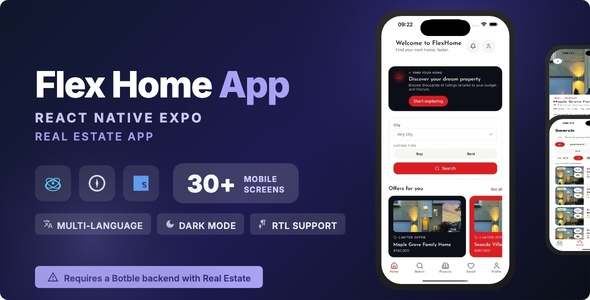
Flex Home | React Native Real Estate Mobile App

Version Download:
Original price was: $29.00.$5.00Current price is: $5.00.
Flex Home is a React Native (Expo SDK 54) mobile app for real-estate businesses. It is the mobile client for a Botble real-estate backend: properties, projects, agents, saved listings, consultations and account data all come from your existing site over its REST API. One codebase builds both iOS and Android.
It is aimed at agencies, property marketplaces and independent agents who already run a Botble real-estate site and want their listings on phones. Every piece of brand identity – name, bundle id, scheme, colours, fonts – lives in a single .env file, with neutral defaults in the source, so you can rebrand it without touching code.
Which backend do I need?
The app talks to the real-estate plugin’s REST API rather than to one specific site, so it runs against any Botble real-estate backend. You need one of these Laravel scripts, sold separately:
- Homzen – Real Estate Laravel Script
- Flex Home – Real Estate Laravel Script
Set API_BASE_URL to your site, enable the API under Settings > API in the Botble admin, and the app connects. No other backend will work – the app is built against this specific API.
Third-party services you may need
Please read this before buying. Several optional features in this app connect to services that are not ours and are not included in the purchase price. Enabling them requires you to register your own developer or merchant accounts with those providers, accept their terms, and pay any fees they charge. We do not control their pricing, approval processes or availability in your country.
The app runs without any of them. Each feature below is switched off until you supply your own credentials, and nothing else in the app depends on it.
Social login (Google, Apple, Facebook)
- Each provider needs its own developer account and an app registered in that provider’s console, where you generate the client IDs and secrets the app uses
- Google: a Google Cloud / Firebase project and an OAuth client. Free at the volumes a normal app produces, but subject to Google’s terms
- Apple: Sign in with Apple requires membership of the Apple Developer Program, which is a paid yearly subscription (currently 99 USD/year). Apple also requires Sign in with Apple on any iOS app that offers third-party social login, so plan for this cost if you ship to the App Store
- Facebook: a Meta for Developers account and a Facebook app. Meta requires App Review before login works for the public, and may ask for business verification
- Providers you leave unconfigured simply do not appear on the sign-in screen. Email and password sign-in always works
Payment gateways (agent credit packages)
- Payments are processed by your Laravel backend, not by this app. The app opens your site’s existing hosted checkout in a WebView, so whichever gateways you have enabled on the backend are the ones agents can pay with
- Every gateway (Stripe, PayPal, Razorpay, Paystack, Mollie and so on) requires your own merchant account with that provider, plus their onboarding and identity checks
- Gateways charge their own transaction fees and, in some cases, monthly or payout fees. Those fees are set by the provider and are entirely separate from the price of this item. Availability also varies by country
- Some gateways are sold as separate plugins for the Laravel backend rather than shipping with it
- If you do not sell credit packages, you do not need any gateway at all
Push notifications (Firebase)
- Push delivery uses Firebase Cloud Messaging, so you must create your own Firebase project and add google-services.json and GoogleService-Info.plist to the project
- Firebase is a Google service with its own terms. The free tier covers normal messaging volumes, but heavy usage or other Firebase products can require a paid Google Cloud plan
- Push is simply switched off until you configure it. Everything else in the app works without it
- Before making a purchase, please read the Terms and Conditions on this page: Terms & Conditions
- If you have any questions, please first read the FAQ on this page: FAQ
- If you haven’t found the answer to your question, please contact us by e-mail codingshop20@yahoo.com or create ticket.
- Developer Support: Official support from the original developer is not included with purchases from CodingShop.
- Product Updates: Free lifetime updates are not included. Future updates is not free and should buy again.
- Download Access: Purchased products are available for download for 30 days after purchase. We recommend downloading and securely storing your files during this period.
- Security: We take reasonable measures to review the files available on our platform. Customers should also scan downloaded files with up-to-date security software before installation.
- All software products available on CodingShop are distributed under the GNU General Public License (GPL). The applicable license information is provided with each product where applicable. Please review the applicable GPL license terms before using, modifying or redistributing any product.
- CodingShop is an independent digital marketplace and is not the original developer or official distributor of third-party products unless explicitly stated. We do not provide or sell purchase codes, activation codes, license keys.
- You can download the product after the purchase by a direct link on your account page in the downloads section.
Related Products

Radio App | Ionic 5 | Angular | News App | Radio + News in one

Lakaa – Best food delivery APP Template – Flutter 2.0 – Android & IOS UI Kit

WhatsUp React Native Theme/Template

Cab2door Online Taxi Booking App Full Solution 3.0

React Native – Definance Crypto Wallet Ethereum, ERC20
