

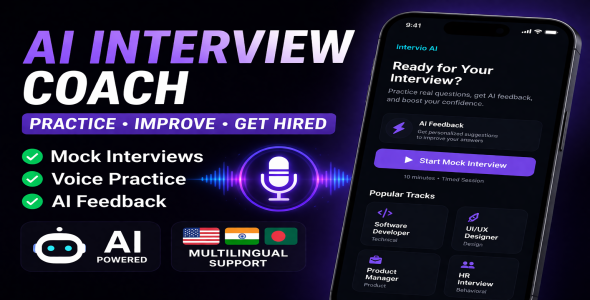
Intervio AI – Interview Preparation App with Voice, Mock Tests, AI Feedback Multilingual Support

Version Download:
Original price was: $24.00.$4.00Current price is: $4.00.
Intervio AI helps candidates rehearse job interviews in a low-pressure environment. You choose a professional track (for example software engineering, design, product management, or HR-style behavioral questions), answer prompts in text or by voice, and receive structured feedback that highlights strengths, weaknesses, and concrete suggestions. The experience is designed to feel like a calm, premium “SaaS dark mode” workspace rather than a noisy social app.
The app balances offline-first reliability with optional cloud intelligence. Without any API configuration, a built-in practice engine still serves realistic questions, timing, and heuristic scoring so demos and daily practice always work. When you add an OpenAI or Google Gemini key in developer configuration, the same screens gain richer reviews, follow-up questions, question generation tailored to your résumé and job description, and multiple rewrite and coaching modes.
Session summaries and per-question breakdowns are stored on the device, supporting reflection over time without assuming a user account or backend database for core progress data.
Features — detailed
Interview tracks & session types
- Multiple role tracks — Dedicated question pools and keyword-aware offline scoring for Software Developer, UI/UX Designer, Product Manager, and HR / behavioral-style interviews.
- Open practice — Standard flow: welcome message, ordered questions, send answers, structured feedback after each response, then the next question until the set completes.
- Timed mock interview — A visible countdown (for example ten minutes) creates time pressure similar to live screens. When time expires, the session can end gracefully with a summary path.
- Daily quick drill — A short session (three prompts) for busy days; ideal for maintaining habit. Questions can be augmented by cloud generation when configured, with local fallbacks.
- Skip / next question — Rotate or skip within the queue when you want a different angle without leaving the session.
- Restart session — Clear the thread and start a fresh queue with confirmation, without losing app-level settings.
Chat experience & feedback
- Chat-style transcript — Questions, your answers, and assistant messages (feedback, hints, follow-ups) appear in a scrollable conversation with subtle animations.
- Structured feedback card — After scored turns, see score percentage, strengths, weaknesses, suggestion bullets, narrative summary, and optional delivery notes (e.g. filler-word awareness, answer length).
- Reply source indicator — Small labels distinguish Cloud AI responses from On-device mock or fallback paths so you know what powered a given message.
- Draft feedback — Get a lighter review on text still in the composer before you commit to a final submission.
- Improve answer — One-tap help to tighten wording; uses remote model when available, otherwise template-based offline improvement.
- Coaching hint — Short, actionable guidance based on your current draft and the active question.
- Example outline — Shows a compact structure (e.g. opening, proof, reflection) you can personalize—not a script to memorize.
- Rewrite modes — Professional tone, concise length, or STAR-shaped rewrite; again with API preference and offline fallback.
- AI follow-up questions — After some answers, the assistant may ask a single deeper follow-up before advancing the main queue, when cloud AI is enabled.
Questions: local pool & cloud generation
- Curated offline question banks — Each track ships with many realistic prompts; the first item is typically a classic opener (e.g. “Tell me about yourself”), followed by shuffled role-specific questions.
- Cloud-generated session lists — With API keys set, the app can replace or merge the queue using the LLM, using your profile context and hints from past weak areas.
- Weak-area awareness — Recent session weaknesses and lower-scored prompts can bias new question generation toward themes you should rehearse more.
Voice & accessibility
- Speech-to-text input — Microphone control in the composer; uses the system speech recognizer with permission handling and clear error states.
- Recognizer language alignment — Practice language (English, Bengali, Hindi) can drive recognition locale tags where supported.
- Text-to-speech (read aloud) — Play assistant messages with device TTS; configurable read-aloud accent presets including English (US), English (India), Bengali (Bangladesh), and Hindi (India), plus speed presets.
- Reduce motion — User preference to shorten motion for a calmer, more accessible UI.
Profile, targeting & personalization
- Interview language — Influences cloud coaching language and STT locale selection.
- Seniority & company type — Stored preferences that shape AI prompts for difficulty and scenario style (e.g. startup vs enterprise).
- Job description & résumé highlights — Optional free-text fields stored locally; when using cloud AI, content is sent only after light PII scrubbing (emails, phone-like patterns, long digit runs).
- Notifications & sound — Toggles for local reminders and optional sound feedback (device volume).
- Grouped settings UI — Sections for General, Interview & job, Cloud AI information, and Read aloud, with consistent cards and selectors.
History & session summaries
- Session list — Browse past runs with role title, dates, average score, answered count, and mock badge where applicable.
- Session summary screen — After completion, strengths, weaknesses, suggestions, and score presentation with actions to restart or return home.
- Session detail — Per-question previews, scores, and stored structured feedback text for review.
- Local persistence — Summaries saved in app storage; privacy copy explains data stays on device and is not used to train models.
Monetization hooks (configurable)
- AdMob integration — Banner and interstitial patterns can be enabled via configuration for production builds; test IDs documented for development.
- Before making a purchase, please read the Terms and Conditions on this page: Terms & Conditions
- If you have any questions, please first read the FAQ on this page: FAQ
- If you haven’t found the answer to your question, please contact us by e-mail codingshop20@yahoo.com or create ticket.
- Please note that any digital products presented on the website do not contain malicious code, viruses or advertising. You buy the original files from the developers. We do not sell any products downloaded from other sites.
- we have not responsible for support users. if you need support, you can buy products directly from envato.
- Note that we can NOT provide purchase code for you. all products is Non-Licensed.
- we can NOT support free updates for you. download links available until 30 days after purchase.
- You can download the product after the purchase by a direct link on your account page in the downloads section.
Related Products

Cab2door Online Taxi Booking App Full Solution 3.0

Mr.Doctor React Native Theme/Templates
