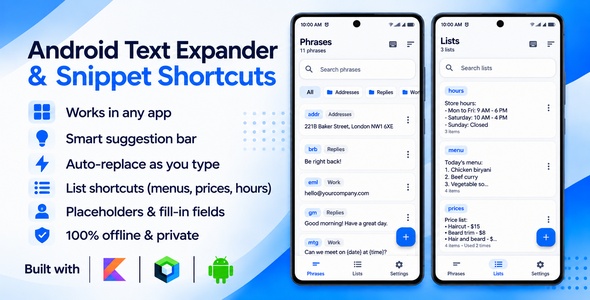
Shortype | Text Expander and Snippet Shortcuts Android App

Version Download:
Original price was: $29.00.$5.00Current price is: $5.00.
Shortype is a complete, production-ready native Android text expander. Save a phrase once, type a short shortcut like gm in any app (WhatsApp, Telegram, Gmail, notes apps, browsers) and get the full text: “Good morning”. One shortcut can type a whole price list, fill in today’s date, paste the clipboard or ask for a name in a small form before typing.
Shortcuts work in every standard text field, including rich text editors and text fields on websites. The one exception is a browser’s address bar (Chrome, Brave and others). Browsers don’t report what is typed in the address bar to accessibility services, so no text expander can see a shortcut there.
Shortype runs 100% on the device. There is no server, no account, no sign-up, and the app does not even request the INTERNET permission. Shortcuts and settings are stored in a local Room database. That means no backend to rent, no API keys to configure, no monthly hosting bill, and nothing for you to maintain after you publish. You buy the source, rebrand it, and ship it.
The full Kotlin source code is included, built with Jetpack Compose, Material 3, Room and Android’s Accessibility API in a clean MVVM architecture.
Android Only: iOS Not Included
This item is for Android only. iOS is not included or supported.
Expansion That Actually Works
Most text expanders work in a plain text box and fail everywhere else. Shortype is built for the apps people really type in:
- Works in tricky editors. Notes apps with rich text editors, chat apps with custom input views and fields that hide from accessibility are all found, so shortcuts expand where other expanders see nothing.
- Browser address bars too. Chrome and other browsers auto-complete as you type: after
hrthe bar may holdhrblock.com. Shortype ignores the auto-completed part, so the shortcut still matches. - A fallback for stubborn apps. When an app refuses to have its text replaced, the phrase is pasted over the shortcut instead, the way a user would do it. The previous clipboard is put back where Android allows, and Android 13+ is told not to show the phrase in its “copied” preview.
- Never writes over the wrong text. The field is read again just before anything is typed. If the text box closed or the shortcut is no longer there, nothing is inserted and a short message says why.
- No double expansions. A phrase that happens to end in another shortcut is never expanded again, and a shortcut brought back with Backspace is left alone while you keep typing.
- No extra permissions. The suggestion bar and fill-in form are drawn by the accessibility service itself, so there is no “draw over other apps” permission to ask for, and the bar never takes the keyboard away from the field.
- Before making a purchase, please read the Terms and Conditions on this page: Terms & Conditions
- If you have any questions, please first read the FAQ on this page: FAQ
- If you haven’t found the answer to your question, please contact us by e-mail codingshop20@yahoo.com or create ticket.
- Developer Support: Official support from the original developer is not included with purchases from CodingShop.
- Product Updates: Free lifetime updates are not included. Future updates is not free and should buy again.
- Download Access: Purchased products are available for download for 30 days after purchase. We recommend downloading and securely storing your files during this period.
- Security: We take reasonable measures to review the files available on our platform. Customers should also scan downloaded files with up-to-date security software before installation.
- All software products available on CodingShop are distributed under the GNU General Public License (GPL). The applicable license information is provided with each product where applicable. Please review the applicable GPL license terms before using, modifying or redistributing any product.
- CodingShop is an independent digital marketplace and is not the original developer or official distributor of third-party products unless explicitly stated. We do not provide or sell purchase codes, activation codes, license keys.
- You can download the product after the purchase by a direct link on your account page in the downloads section.
Related Products
Driver Companion App for FoodTiger Delivery

Doctor Consultation App with Web Admin Panel and CMS

Lakaa – Best food delivery APP Template – Flutter 2.0 – Android & IOS UI Kit

SkiMontana React Native Tour App Theme/Template

WPGYM App – Mobile App for WordPress Gym System