

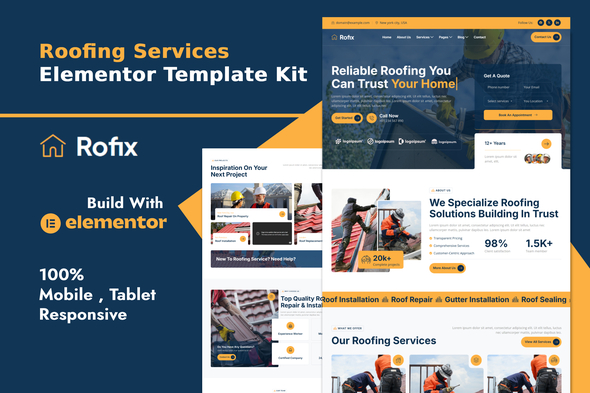
Rofix – Roofing Services Elementor Template Kit

Version Download:
Original price was: $19.00.$3.00Current price is: $3.00.
Rofix – kit designed for industrial roofing, commercial roofing, construction, roof installation, maintenance, renovation, repair services, roof repair, roofers, roofing services, roofing companies.
Rofix has a clean and professional design with a 100% responsive layout. It is retina-ready and very easy to customize because it uses Elementor, so you don’t need a single line of coding!
This Template Kit contains page content for creating Elementor pages. This kit has been optimized with the free “Hello Elementor” theme.
Layout Features :
- Modern and Professional design
- Cross Browser Compatibility
- Responsive & mobile-friendly
- 14+ Page templates ready to use
- Customize fonts and colors in one place (Global Kit Style)
What’s Included in the Zip :
- Home
- About
- Services
- Service Details
- Team
- Pricing
- Project
- Project Details
- FAQ
- Blog
- Blog Details
- Contact
- MetForm
- 404 Error
- Header
- Footer
Plugins installed with kit
- Elementor
- Jeg Kit for Elementor
- MetForm
- Qi Addonns For Elementor
How to Use Template Kits:
This is not a WordPress Theme. Template kits contain the design data for Elementor only and are installed using the envato Elements plugin for WordPress or directly through Elementor.
- Download your kit file from Envato and do not unzip it. If you use Safari browser you may need to ensure “Open safe files after downloading” is disabled in the browser preferences.
- Go to Settings > Permalinks and ensure Post Name is selected
- Go to Appearance > Themes > Add New and ensure Hello Elementor is installed and activated. This will prompt you to install Elementor if you haven’t already.
- Go to Plugins and ensure Elementor and Envato Elements are installed and at the latest version. If your kit requires Elementor Pro, it must be installed now and connected to your account.
- Go to Elements > Installed Kits and click Upload Template Kit Zip (or click your kit to view it)
- Check for the orange banner at the top and click Install Requirements to load any plugins the kit uses.
- Click import on the Global Kit Styles first. This will setup the site settings.
- Click Import on one template at a time in the order shown. These are stored in Elementor under Templates > Saved Templates and are re-used from here.
- Before making a purchase, please read the Terms and Conditions on this page: Terms & Conditions
- If you have any questions, please first read the FAQ on this page: FAQ
- If you haven’t found the answer to your question, please contact us by e-mail codingshop20@yahoo.com or create ticket.
- Developer Support: Official support from the original developer is not included with purchases from CodingShop.
- Product Updates: Free lifetime updates are not included. Future updates is not free and should buy again.
- Download Access: Purchased products are available for download for 30 days after purchase. We recommend downloading and securely storing your files during this period.
- Security: We take reasonable measures to review the files available on our platform. Customers should also scan downloaded files with up-to-date security software before installation.
- All software products available on CodingShop are distributed under the GNU General Public License (GPL). The applicable license information is provided with each product where applicable. Please review the applicable GPL license terms before using, modifying or redistributing any product.
- CodingShop is an independent digital marketplace and is not the original developer or official distributor of third-party products unless explicitly stated. We do not provide or sell purchase codes, activation codes, license keys.
- You can download the product after the purchase by a direct link on your account page in the downloads section.
Related Products

Cera – Intranet Community Theme

Parador – Hotel Booking WordPress Theme

Oslim – Consulting & Finance WordPress Theme

FireMobile- WordPress WooCommerce firebase mobile OTP authentication 1.2.1
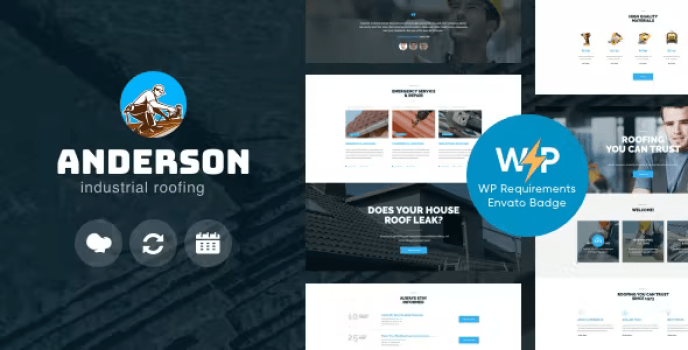
Anderson – Industrial Roofing Services Construction WordPress Theme 1.2.5
