

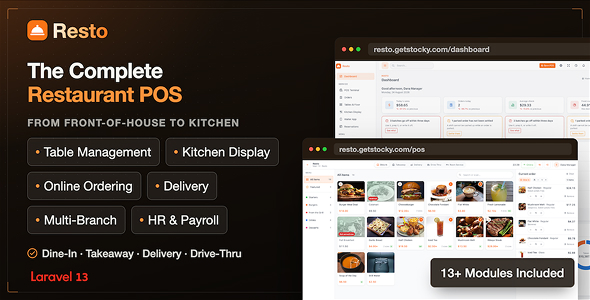
Resto — Restaurant Management System, POS, KDS Online Ordering

Version Download:
Original price was: $29.00.$5.00Current price is: $5.00.
Resto is a complete restaurant operating system in one Laravel application. One install runs the till, the kitchen screens, the floor plan, the waiter’s phone, the stockroom, the purchase ledger, the payroll, the double-entry books, the online store and the reports that tie them all together — for one restaurant or for a group of branches sharing a single database.
It is not a POS with some reports bolted on. A burger sold at the till leaves the walk-in as a bun, 150 g of beef and 20 g of cheese, lands as a journal in the general ledger, awards points to the customer who bought it, and shows up in the food-cost report as a margin — without anybody typing anything twice.
Everything is self-hosted. No SaaS subscription, no per-terminal licence, no monthly fee. Install it once on your own server or on ordinary shared hosting, and it is yours.
Why buyers pick Resto
- It covers the whole restaurant, not one slice of it. POS, KDS, floor, delivery, inventory, purchasing, HR, accounting and e-commerce ship in the same box, already wired together.
- It runs on shared hosting. No Node daemon, no Redis, no websocket server, no queue worker required. If it can run Laravel and MySQL, it can run Resto.
- It keeps selling when the internet drops. The POS terminal queues orders locally and syncs them the moment the connection returns.
- The numbers are auditable. Stock, loyalty points and gift-card balances are ledgers, not editable columns. Refunds are separate documents; the original sale is never rewritten.
- It installs in a browser. A five-step wizard checks the server, writes .env, migrates the schema and creates the owner account. No SSH, no editing config files.
- 8 languages out of the box, including full RTL Arabic — plus a built-in translation editor so you can add your own without touching a file.
Feature list
1. Web installer
A guided, five-step first-run wizard:
- Requirements check — PHP version, extensions, directory permissions, all shown pass/fail before you go any further.
- Application settings — site name, URL, timezone.
- Application key generated for you.
- Database — credentials with a Test connection button that verifies before it commits.
- Administrator account — the first owner.
- Review & install — migrates the schema, seeds the restaurant, writes the install marker.
Answers are held in the session until the final confirmation, so an abandoned wizard can never leave you with a rewritten .env pointing at an un-migrated database. Once installed, the installer seals itself off.
2. Dashboard
The first screen of the day, built to answer three questions in order:
- How is today going against yesterday — takings, orders, average check, covers.
- Is anything about to become a problem — low stock, unpaid tables, late deliveries, pending reservations, unmoderated feedback.
- Where is the month heading — a trend chart over trading history with a moving average drawn over it.
Branch-scoped, so a manager sees their outlet and an owner sees the one they select. Every aggregate is an indexed group-by, so it stays fast as history grows.
3. POS terminal
The till, built for a touchscreen and a busy service.
- Three-state flow — pick a terminal, open a shift with a declared float, then sell. Each is its own screen, so a cashier is never looking at a grid they cannot ring up on.
- Fast item grid — categories, featured items, search-or-scan, variants and sizes inline.
- Modifiers with rules — required groups, min/max choices, priced options, free allowances. The terminal enforces them before the order can be sent.
- Combos — “choose a main, choose a drink” groups resolved at the till.
- Order types — dine-in, takeaway, delivery, drive-thru and room service, each able to carry its own prices and taxes.
- Park & recall — hold an order under a name you’ll recognise (“Blue jacket, Table 5”) and pick it back up later.
- Send to kitchen without payment — fire the ticket, take the money at the end.
- Split & partial payments — multiple tenders on one bill, with the balance still due shown after each.
- Payment methods — cash (with change calculation and cash-drawer control), card with reference/auth code, wallet, gift card, customer account credit, and online.
- Tips — preset percentages or a custom amount, tracked separately as money owed to staff.
- Discounts and voids — reason-coded, and optionally locked behind a manager PIN.
- Line-based refunds — refund half a table’s order; each line remembers how much has already been given back, so the same dish can never be refunded twice. The original sale is never edited.
- Offline mode — a service worker keeps the terminal loadable with no connection, orders queue locally, and a badge shows what’s waiting. They sync automatically when the line comes back, and any order that needs attention says so.
- Receipt printing through the browser — thermal, laser or PDF, no driver and no vendor library.
- Staff clock-in at the terminal by PIN — the same PIN used for manager overrides, so it’s one number per person.
4. Shifts & cash-up
- Open a shift with a declared opening float.
- Cash movements during the shift — paid-outs, drops, pick-ups, all reason-coded.
- Close the shift by counting the drawer: expected versus counted, with the variance calculated for you.
- Shift report — takings by payment method, discounts, voids, refunds, tips, per terminal and per person.
- Shift log in the back office for every cash-up ever taken.
- Before making a purchase, please read the Terms and Conditions on this page: Terms & Conditions
- If you have any questions, please first read the FAQ on this page: FAQ
- If you haven’t found the answer to your question, please contact us by e-mail codingshop20@yahoo.com or create ticket.
- Developer Support: Official support from the original developer is not included with purchases from CodingShop.
- Product Updates: Free lifetime updates are not included. Future updates is not free and should buy again.
- Download Access: Purchased products are available for download for 30 days after purchase. We recommend downloading and securely storing your files during this period.
- Security: We take reasonable measures to review the files available on our platform. Customers should also scan downloaded files with up-to-date security software before installation.
- All software products available on CodingShop are distributed under the GNU General Public License (GPL). The applicable license information is provided with each product where applicable. Please review the applicable GPL license terms before using, modifying or redistributing any product.
- CodingShop is an independent digital marketplace and is not the original developer or official distributor of third-party products unless explicitly stated. We do not provide or sell purchase codes, activation codes, license keys.
- You can download the product after the purchase by a direct link on your account page in the downloads section.
Related Products

Dboss – NFT Drop Collection Template

Charitio – Crowdfunding Platform

HR Records plugin for RISE CRM
Inventory Management plugin for RISE CRM
Ekattor 8 School Management System 2.0
