

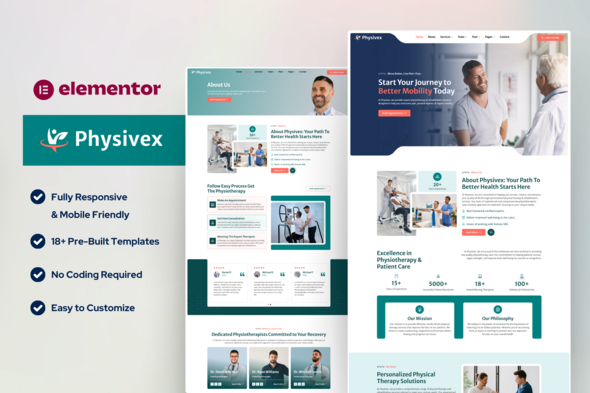
Physivex – Physical Therapy Physiotherapy Elementor Template Kit

Version Download:
Original price was: $29.00.$5.00Current price is: $5.00.
Physivex is a professionally designed website template specifically crafted for physical therapy clinics, physiotherapists, rehabilitation centers, and wellness professionals. Built with Elementor, this template kit offers a modern, user-friendly layout with a clean and responsive design.
With pre-built pages and sections, you can easily showcase your services, therapist profiles, pricing plans, client testimonials, and blog articles. The MetForm integration ensures seamless appointment booking and contact form functionality, while the Jeg Elementor Kit provides enhanced customization options for headers and footers.
This template kit is fully responsive, SEO-friendly, and easy to customize without needing any coding knowledge. Whether you’re setting up a new website or revamping an existing one, Physivex makes it simple to create a professional and engaging online presence for your physical therapy practice.
Key Features:
- ✔ Fully customizable with Elementor
- ✔ Pre-designed pages for services, pricing, and therapist details
- ✔ MetForm for contact and appointment forms
- ✔ Mobile-friendly and SEO-optimized design
- ✔ Easy-to-edit global header and footer
Perfect for: Physiotherapists, physical therapy clinics, chiropractic centers, rehab facilities, and wellness professionals.
Required Plugins:
- Elementor
- Gum Elementor Addon
- Jeg Elementor Kit
- MetForm
What’s Included in the Zip:
- Home
- About
- Services
- Services Details
- Pricing
- Blog
- Single Blog
- Contact Page
- Contact Form
- Newsletter Form
- Coming Soon
- Thank You
- 404 Page
- Header
- Footer
- Global Kits
This is not a WordPress Theme. Template kits contain the design data for Elementor only and are installed using the Envato Elements plugin for WordPress or directly through Elementor.
How to Import MetForm Custom Form:
- Import MetForm template.
- Import the template where the form appears, then edit in Elementor.
- Click the MetForm widget in the column where the form should be and click Edit Form.
- Select New, leave blank selected then click Edit Form button.
- Click ‘Add Template’ grey folder button.
- Click ‘My Templates’ tab.
- Choose your imported MetForm template, then click ‘Insert’.
- Once the template is loaded, click ‘Update’.
- Before making a purchase, please read the Terms and Conditions on this page: Terms & Conditions
- If you have any questions, please first read the FAQ on this page: FAQ
- If you haven’t found the answer to your question, please contact us by e-mail codingshop20@yahoo.com or create ticket.
- Please note that any digital products presented on the website do not contain malicious code, viruses or advertising. You buy the original files from the developers. We do not sell any products downloaded from other sites.
- we have not responsible for support users. if you need support, you can buy products directly from envato.
- Note that we can NOT provide purchase code for you. all products is Non-Licensed.
- we can NOT support free updates for you. download links available until 30 days after purchase.
- You can download the product after the purchase by a direct link on your account page in the downloads section.
Related Products

Cera – Intranet Community Theme

University – Education Responsive WordPress Theme
