

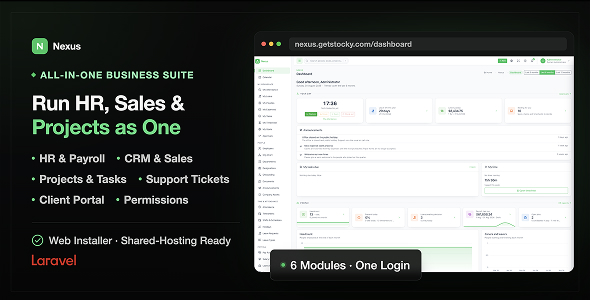
Nexus – HR, CRM Project Management System

Version Download:
Original price was: $29.00.$5.00Current price is: $5.00.
Nexus runs the people, the pipeline and the projects out of one Laravel application. Employees, attendance, leave and payroll. Leads, deals, quotes, invoices, contracts and support tickets. Projects, tasks, sprints, time and the invoice that comes out the other end. One install, one database, one login.
There is no separate “employee” record. The person who books leave is the same row as the person who owns the deal and the person assigned the task. That is not a schema detail — it is why a developer’s logged hours become a client invoice without anybody retyping a name, why a sales manager’s approvals queue already knows who reports to them, and why nothing has to be kept in step by hand.
Everything is self-hosted, and it runs where you already host. No cron job. No queue worker. No Redis, no websockets, no Node on the server. If it can run Laravel and MySQL, it can run Nexus.
Why buyers pick Nexus
- Three systems in one, actually joined up. HR, CRM & Sales and Projects share one directory of people, one permission model, one calendar, one search box and one activity log. Buy it for one module and the other two are already there when you need them.
- It installs in a browser. A six-step wizard checks the server, tests the database, writes .env, migrates, seeds and creates your account. No SSH, no editing config files.
- It runs on shared hosting, by design. Nothing is scheduled and nothing is queued. Email goes out inline; recurring invoices wait for a button that is safe to press twice. The constraint is deliberate — a product that needs a background worker is a product a shared host cannot run.
- Permissions are real. Twelve sections, seven starting roles, and the middleware on the route is the guard — not a hidden menu link. Self-service and manager approvals need no permission at all, because managing your own team is not the same as running HR.
- Clients get their own front door. A separate portal where they read invoices, accept quotes, sign contracts and raise tickets — not the back office with pieces hidden.
- 8 languages out of the box, including full RTL Arabic — plus a built-in translation editor, so adding a ninth never needs a developer or a template file.
- It tells you what it does not do. There is a section below for that. Every link in the sidebar opens a real screen.
Feature list
1. Web installer
A guided, six-step first-run wizard. Every address on a fresh copy redirects into it.
- Requirements — PHP version, twelve extensions and six writable paths, each shown pass or fail, with a re-check button. Nothing has been written yet.
- Company — name, currency and timezone. An application key is generated for you.
- Database — host, port, name, user and password, with a Test connection button that verifies before it commits. If the database does not exist, Nexus creates it, provided your database user may.
- Administrator — your account, with the admin role.
- Sample data — an optional twelve-person demo company, on a tick box, so you can walk into a populated system instead of an empty one.
- Review & install — writes .env, migrates, seeds the reference data and creates your account. The log narrates each step and stops exactly where a failure happened.
Nothing is written until the last step: the wizard holds your answers in the session, so an abandoned install can never leave a deployment with a rewritten .env pointing at a database that was never migrated. Once finished, the installer seals itself off and /setup redirects away.
2. Roles, permissions & locations
- Twelve permission sections — employees, attendance, leave, payroll, recruitment, performance, CRM, sales, support, projects, reports, settings. Each is a tick box on a person’s record.
- Seven roles ship — Administrator, HR, Manager, Sales, Project manager, Accountant, Employee. A role is a starting point that sets sensible boxes, not a cage: tick and untick from there.
- Self-service needs no section. Every signed-in person sees their own attendance, leave, payslips, expenses, timesheet, goals and tasks — scoped to themselves, always.
- Approvals need no section either. Anybody with people reporting to them gets an approvals queue for their own reports, without being handed the HR module.
- Projects add per-record access — a developer with no projects permission still opens the two projects they were added to, as viewer, member or manager, and nothing else.
- Deactivating somebody stops them signing in immediately and kills their API tokens with them, without deleting a thing they did. Their name stays on the deals they won.
- Locations — an office, a site, a country. Holidays are declared per location, leave counting skips the right ones, and reports filter by them.
Hiding a menu item is presentation. A person who types a URL they may not have gets a 403.
3. Dashboard
Assembled from what you are allowed to see. A sales user gets pipeline and revenue; an HR user gets headcount and who is off today; a project manager gets delivery. Nothing is computed for a section you cannot open, so a narrow account is a fast page.
- Mine — everybody gets this one: today’s clock state, leave balance, tasks due, and what is waiting on you to approve.
- People — headcount and its change, joiners and leavers by month, probations and contracts ending inside 30 days, documents about to expire, present and late today, worked and overtime trends, pending leave and who is off, payroll gross and net by month, the candidate funnel and today’s interviews.
- Commercial — open pipeline with its weighted value and its shape by stage, activities due and overdue, deals won and lost by month; invoiced against received drawn on one money axis, never two, so the gap reads as the collection lag it is; outstanding and overdue balances with the five worst invoices; ticket volume and SLA breaches.
- Delivery — active projects, tasks created against completed per week, overdue and due-this-week, hours logged this week against last, unbilled hours waiting to be invoiced, open issues by severity and the milestones coming up.
Headline figures show their change against the previous period, because a number without a direction is decoration.
4. People
- Employees — the directory, and the record every other HR screen hangs off. Manager, department, designation, location, hire date, employment type, probation end, salary, contact and bank details.
- Employee codes are generated from a prefix and never reused, so a code points at one person for the life of the system.
- The record has tabs — profile, attendance, leave, documents, assets, salary, goals and reviews. Each is the module’s own data filtered to this person; there is no second copy anywhere.
- Departments with an optional head and an optional parent, and designations as job titles. Neither can be deleted while somebody is in it.
- Org chart — the reporting tree drawn from the manager field, clickable through to the person.
- Leavers — set a leave date and the person drops out of headcount, rosters and pay runs while every payslip, approved leave and won deal stays readable.
5. Onboarding, documents, announcements & assets
- Onboarding checklists — build a template once as a list of tasks, assign it to a starter, and the due dates are counted from their start date. A candidate hired through recruitment can have one attached at the moment they are converted.
- Documents — contracts, certificates, ID copies, right-to-work papers, each with a category and an expiry date. The overview filters to expiring within 30 days or already expired, with counts at the top, so a visa or a certification does not lapse quietly.
- Announcements — company notices, optionally scoped to a department or a location, optionally pinned, shown on the dashboard of the people they are aimed at. Drafts appear to nobody.
- Company assets — laptops, phones, keys, cars. Assign from a date, return on another; every assignment is kept, so the asset shows everyone who has held it and the person shows what they currently hold. That second list is the one you want on a leaver’s last day.
6. Attendance & timesheets
- A month at a time — everybody down the side, days across the top, one coloured cell each. Click a cell to open and correct that day.
- Four actions make a day — in, break start, break end, out. People clock themselves, HR can type a day in if manual entry is allowed, and a device or an app can post one over the API. Every row records where it came from, so a hand-entered day stays distinguishable from a clocked one.
- Status against the schedule — present, late (past the start time plus the grace minutes), half day, absent, on leave, holiday. Approved leave and public holidays are drawn into the grid automatically; nobody marks a holiday as an absence.
- CSV import and export — the import takes a header row from a biometric device or a spreadsheet, identifies a person by employee code or email, and skips rows that name nobody rather than guessing at them. It reports how many landed and how many did not.
- Weekly timesheets — press Build to generate the week from the attendance already recorded. Building again refreshes drafts and rejected sheets and leaves submitted and approved ones alone, so it is safe to press twice.
- Draft → submitted → approved. Only approved timesheets feed payroll — overtime sitting in a draft pays nothing.
7. Shifts, rosters & holidays
- Shifts — a named pattern with a start, an end, a break allowance and the days it covers. Anybody without one follows the company default.
- Rosters — assign people to shifts across a week. That is what stops a part-timer or a night-shift employee from looking permanently absent, and it changes what “late” means for them.
- Holidays per year, per location, company-wide or for one office. Subtracted everywhere it matters: not working days for leave counting, not absences on the grid, no cost to pay, and the workload chart does not expect anybody at their desk.
8. Leave
- Leave types are the policy — days per year, paid or unpaid, monthly accrual or yearly allocation, carry-over maximum, whether an attachment is required, and a minimum notice in days. Either accrual prorates a hire year, so somebody joining in September does not start with twelve months of holiday in hand.
- Balances per person, per type, per leave year, holding allocated, carried in, taken and pending. Allocate recalculates a year; Adjust writes a manual correction with a reason — which is how you grant a one-off without lying about the policy.
- Requesting counts the working days in the range, skipping weekends and the holidays at that person’s location, with half days at 0.5, and refuses the request if the balance will not cover it or the notice is too short.
- Deciding happens from the leave screen, the approvals queue or the email. On approval the days move from pending to taken, the attendance grid fills in, and the leave lands on the shared calendar so nobody schedules a workshop into it.
- Team leave calendar — the whole team’s booked leave in a month view. The screen to check before approving anything.
9. Payroll
Real pay runs that read the clock, not a spreadsheet with a nicer font.
- Salary components — earnings and deductions, each a fixed amount or a percent of basic. Housing, transport, pension, union fee: you define the vocabulary your country uses.
- A person’s structure is their basic, a frequency (monthly, weekly or hourly) and the components attached to them. Everything else, payroll reads from the clock.
- A pay run covers a period and moves draft → approved → paid, generating a payslip for every employed person with a structure.
- What builds a payslip — basic (monthly as-is, weekly scaled by the days in the period, hourly by the minutes actually worked), each component, overtime from timesheets approved in the period at the multiplier from settings, expense reimbursements approved and unpaid, unpaid leave and absence at a day’s pay each, and loan instalments for every active loan. Every line shows where it came from.
- Regenerate rebuilds a draft from current data, because somebody always forgets to clock out. Approve freezes the figures — the point of a payroll record is that it says what was actually paid.
- Paying the run stamps the payslips, reduces the loan balances and marks the reimbursed claims paid. A claim is only ever paid once.
- The day rate is the basic over the working days in the period, weekends and that person’s location holidays excluded; the hourly rate is the day rate over their scheduled hours. Nothing is rounded until the payslip is written, so the lines add up to the total exactly.
- Print gives an A4 payslip, Email payslips sends each person theirs, and everybody can read their own whether or not you email them.
No tax engine, on purpose. Income tax and social contributions change by country and by year, and a table that is subtly out of date is worse than none. They are modelled as deduction components with the rates your accountant supplies, and they print on every payslip.
10. Loans, advances & expense claims
- Loans — a title, an amount, a number of instalments and a start date. Each paid run takes one instalment and reduces the balance; the payslip always shows what was taken and what is left, so nobody keeps a side spreadsheet.
- Advances are the same record with one instalment.
- Expense claims — staff file them with a category, an amount, the date it was spent, a note and a receipt. Pending → approved or declined → paid. Mark one paid by hand, or leave it to the next pay run, which reimburses every approved unpaid claim on the payslip.
- Claim categories are yours, set in HR settings.
11. Recruitment & the public careers page
- Job openings — title, department, location, employment type, description, seats, status. Published ones appear on the careers page; drafts and closed ones do not.
- Candidate kanban — new, screening, interview, offer, hired, rejected, moved by dragging. A CV and any other files attach to the record, and a rating out of five can be set from the card.
- Sources — careers page, referral, LinkedIn, job board, agency, other — so you can see which channel actually produces hires rather than which produces applications.
- Interviews — a date, a length, a room or a meeting link, and a panel. Everybody involved is notified and it lands on the shared calendar.
- Scored feedback, one entry per interviewer — a rating, written comments and a recommendation of hire, hold or reject. The decision gets made against something written down rather than the loudest memory in the room.
- Hire creates the user account, allocates the employee code, attaches an onboarding checklist if you pick one, and counts a seat filled. The candidate record stays, linked to the person, so you keep the whole history of how they arrived.
- A public careers page at /careers with a page per opening and an application form that creates a candidate at the first stage. Switch it on or off and write the introduction from settings. It follows your theme and the visitor’s language.
12. Performance — goals, reviews, training, warnings
- Goals & OKRs with key results underneath: a title, a target, a current value and a unit, so “grow trial sign-ups” becomes “trial sign-ups: 340 of 500”. Moving a key result moves the goal’s progress — nobody types a percentage. Goals nest, so a company objective carries the team goals underneath it, each with its own owner.
- Review cycles — a name, a period, a due date and a question set. Opening a cycle hands every employee a self review and their manager a manager review, each question rated one to five with room for comment. A submitted form scores as the mean of its ratings, so a person’s own score sits beside their manager’s — and the gap between the two is usually the conversation worth having.
- Training — a course with a trainer, a date, a location and a cost; add attendees, mark who actually came. Completed training shows on the employee record, which is what a certification audit asks for.
- Warnings — verbal, written or final, with who issued it, why, and an acknowledgement the employee can stamp. Warnings sit behind the performance permission, not the employee one, so a colleague who can read the directory cannot read these.
- Before making a purchase, please read the Terms and Conditions on this page: Terms & Conditions
- If you have any questions, please first read the FAQ on this page: FAQ
- If you haven’t found the answer to your question, please contact us by e-mail codingshop20@yahoo.com or create ticket.
- Developer Support: Official support from the original developer is not included with purchases from CodingShop.
- Product Updates: Free lifetime updates are not included. Future updates is not free and should buy again.
- Download Access: Purchased products are available for download for 30 days after purchase. We recommend downloading and securely storing your files during this period.
- Security: We take reasonable measures to review the files available on our platform. Customers should also scan downloaded files with up-to-date security software before installation.
- All software products available on CodingShop are distributed under the GNU General Public License (GPL). The applicable license information is provided with each product where applicable. Please review the applicable GPL license terms before using, modifying or redistributing any product.
- CodingShop is an independent digital marketplace and is not the original developer or official distributor of third-party products unless explicitly stated. We do not provide or sell purchase codes, activation codes, license keys.
- You can download the product after the purchase by a direct link on your account page in the downloads section.
Related Products

Todate – The Ultimate QuickDate Theme 1.7

BMCleaner Pro – Full Application Source Code

Dboss – NFT Drop Collection Template

Seller Subscription Addon – Qixer Service Marketplace and Service Finder
Radio.net Scraper : Radio Stations Extraction 1.3
