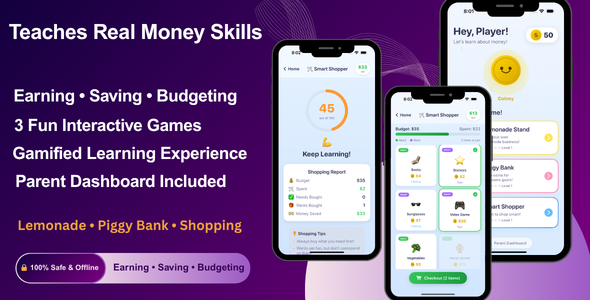
Kids Financial Literacy Game is a premium, production-ready iOS application built entirely using Swift and SwiftUI. It helps children aged 4–10 learn essential money skills through engaging, interactive gameplay. The app works fully offline with no backend, no third-party libraries, and no subscriptions, making it fast, safe, and easy to launch on the App Store.
Why Choose This App?
Teaches real-world financial skills through fun gameplay
100% offline — no API, no Firebase, no server costs
Kid-safe — no ads, no tracking, no analytics
Clean SwiftUI code — easy to customize and rebrand
Production-ready — build and publish immediately
3 Complete Game Modules
Lemonade Stand — Learn Earning & Profit
Buy ingredients and manage resources
Set prices and adjust strategy
Weather system affects customer demand
Customer interactions with preferences and budgets
Profit/loss summaries with tips
Piggy Bank — Learn Saving & Goals
Select savings goals like toys and gadgets
Animated piggy bank with progress tracking
Mini-game to earn coins
Goal completion rewards and celebrations
Smart Shopper — Learn Budgeting
Shop items within a fixed budget
Learn difference between needs and wants
Real-time budget tracking
Smart scoring system with feedback
UI & Experience
Modern kid-friendly interface
Smooth animations using SwiftUI
Interactive feedback with haptics
Confetti celebrations and rewards
Fully responsive for iPhone and iPad
Parent Dashboard
PIN-protected access
Track coins earned and games played
Monitor progress and learning skills
View play time and achievements
Reset data anytime
Key Features
3 fully functional educational games
Level system and rewards
Local data persistence (UserDefaults)
Sound effects and haptic feedback
Offline functionality
No ads or in-app purchases
Technology Stack
Swift 5+
SwiftUI (100% UI)
MVVM Architecture
UserDefaults for storage
No external dependencies
Before making a purchase, please read the Terms and Conditions on this page: Terms & Conditions
If you have any questions, please first read the FAQ on this page: FAQ
If you haven’t found the answer to your question, please contact us by e-mail codingshop20@yahoo.com or create ticket.
Please note that any digital products presented on the website do not contain malicious code, viruses or advertising. You buy the original files from the developers. We do not sell any products downloaded from other sites.
we have not responsible for support users. if you need support, you can buy products directly from envato.
Note that we can NOT provide purchase code for you. all products is Non-Licensed.
we can NOT support free updates for you. download links available until 30 days after purchase.
You can download the product after the purchase by a direct link on your account page in the downloads section.
Related Products
- 86%
$29.00Original price was: $29.00.$4.00Current price is: $4.00.