

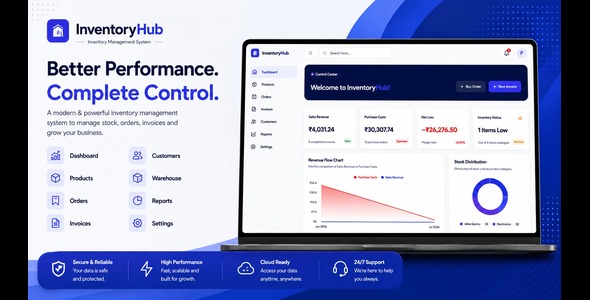
InventoryHub – Inventory Management System – React Script

Version Download:
Original price was: $20.00.$3.00Current price is: $3.00.
Modern Inventory Management System built with React, Node.js, TypeScript & MongoDB
InventoryHUB is a modern and responsive inventory management system designed to help businesses efficiently manage products, stock, customers, suppliers, purchases, sales, users, and other essential inventory operations from a centralized platform.
Built with a modern technology stack including React, TypeScript, Node.js, Express, and MongoDB, InventoryHUB provides a clean user interface together with a structured backend API that can be customized and extended according to your business requirements.
Key Features
- Modern and responsive dashboard
- Product and inventory management
- Category and sub-category management
- Customer management
- Supplier management
- Purchase management
- Sales and order management
- Stock and inventory tracking
- User and role management
- Dashboard statistics and reports
- JWT-based authentication
- Access and refresh token authentication
- RESTful API architecture
- MongoDB database integration
- Form validation and error handling
- Responsive design for desktop, tablet and mobile
Technology Stack
| Frontend | React, TypeScript, Vite |
| Backend | Node.js, Express, TypeScript |
| Database | MongoDB |
| Authentication | JWT Access & Refresh Tokens |
Main Modules
- Dashboard
- Products
- Categories
- Customers
- Suppliers
- Purchases
- Sales
- Inventory & Stock
- Users & Roles
- Reports
- Profile & Settings
Requirements
- Node.js 24.x
- PNPM 10.x
- MongoDB
- Modern web browser
Easy Installation
Detailed documentation is included with the package to help you install and configure both the frontend and backend.
- Install the required dependencies.
- Configure the frontend environment variables.
- Configure the backend environment variables.
- Configure MongoDB.
- Start the backend server.
- Start the React frontend.
Please refer to the included documentation for complete installation and configuration instructions.
Documentation Included
- Installation guide
- Frontend setup
- Backend setup
- Environment configuration
- MongoDB configuration
- Production build instructions
- Troubleshooting guide
- Before making a purchase, please read the Terms and Conditions on this page: Terms & Conditions
- If you have any questions, please first read the FAQ on this page: FAQ
- If you haven’t found the answer to your question, please contact us by e-mail codingshop20@yahoo.com or create ticket.
- Developer Support: Official support from the original developer is not included with purchases from CodingShop.
- Product Updates: Free lifetime updates are not included. Future updates is not free and should buy again.
- Download Access: Purchased products are available for download for 30 days after purchase. We recommend downloading and securely storing your files during this period.
- Security: We take reasonable measures to review the files available on our platform. Customers should also scan downloaded files with up-to-date security software before installation.
- All software products available on CodingShop are distributed under the GNU General Public License (GPL). The applicable license information is provided with each product where applicable. Please review the applicable GPL license terms before using, modifying or redistributing any product.
- CodingShop is an independent digital marketplace and is not the original developer or official distributor of third-party products unless explicitly stated. We do not provide or sell purchase codes, activation codes, license keys.
- You can download the product after the purchase by a direct link on your account page in the downloads section.
Related Products
Ekattor 8 School Management System 2.0

Ekattor 8 Online School Addon Bundle

Purchase Management plugin for RISE CRM
FirstPharma – Pharmacy Management System (POS, GST, C#, MSSQL)

Charitio – Crowdfunding Platform
