

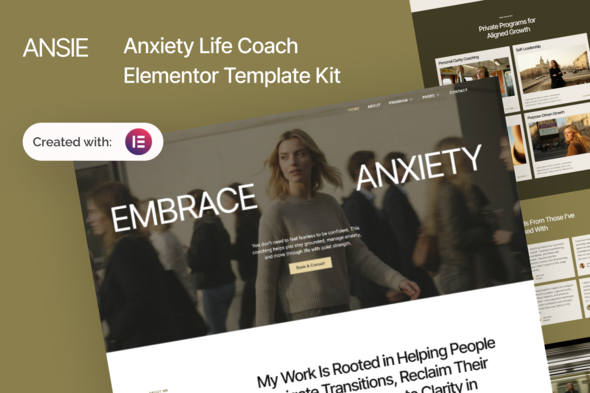
Ansie – Anxiety Life Coach Elementor Template Kit

Version Download:
Original price was: $24.00.$4.00Current price is: $4.00.
Ansie is a calm, supportive, and modern Elementor Template Kit designed for anxiety life coaches, mental wellness practitioners, therapists, counselors, and mindfulness mentors. Built with a soothing visual style and clear content structure, Ansie helps you communicate trust, share your coaching approach, highlight programs, and encourage clients to take the first step toward emotional balance — all without writing a single line of code.
Important Note:
This is a Template Kit, not a WordPress theme. It includes pre-designed layouts optimized for the free version of Elementor and works perfectly with the Hello Elementor.
This Template Is Perfect For
- Anxiety and stress management coaches
- Life coaches and mindset mentors
- Mental wellness practitioners
- Therapists and counselors
- Mindfulness and self-healing programs
- Personal development coaches
Features:
- No Elementor Pro required
- Clean and professional design
- 14 pre-designed pages
- Fully responsive and customizable
- Works with most Elementor-compatible themes
Templates Included:
- Global Theme Style
- Home
- About
- Programs
- Program Detail
- Pricing
- FAQ
- Error 404
- Blog Post
- Single Post
- Contact
- Header
- Footer
- Metform Contact
- Metform Newsletter
Required Plugin:
- Elementor
- ElementsKit Lite
- MetForm
- Gum Elementor Addon
- Ultimate Addons for Elementor – Lite
How to Use Template Kits:
Important Notice
This is NOT a WordPress theme. Template Kits contain design data for Elementor only and are installed using the Envato Elements plugin for WordPress or directly through Elementor.
Installation Steps
- Download your Template Kit file from Envato or ThemeForest and do not unzip it. If you are using Safari, make sure “Open safe files after downloading” is disabled in browser preferences.
- Go to Settings > Permalinks and ensure Post Name is selected.
- Go to Appearance > Themes > Add New and install & activate Hello Elementor. This will prompt you to install Elementor if it is not already installed.
- Go to Plugins and ensure Elementor and Template Kit Import are installed and updated. If your kit requires Elementor Pro, install and connect it to your account.
- Go to WordPress Dashboard > Tools > Template Kits and click Upload Template Kit Zip (or click your kit to view it).
- Check for the orange banner at the top and click Install Requirements to install required plugins.
- Click Import on Global Kit Styles first. This sets up global site styles.
- Import templates one at a time in the order shown. Imported templates are stored under Templates > Saved Templates.
- Before making a purchase, please read the Terms and Conditions on this page: Terms & Conditions
- If you have any questions, please first read the FAQ on this page: FAQ
- If you haven’t found the answer to your question, please contact us by e-mail codingshop20@yahoo.com or create ticket.
- Please note that any digital products presented on the website do not contain malicious code, viruses or advertising. You buy the original files from the developers. We do not sell any products downloaded from other sites.
- we have not responsible for support users. if you need support, you can buy products directly from envato.
- Note that we can NOT provide purchase code for you. all products is Non-Licensed.
- we can NOT support free updates for you. download links available until 30 days after purchase.
- You can download the product after the purchase by a direct link on your account page in the downloads section.
Related Products

TopDeal – Multi Vendor Marketplace Elementor WooCommerce WordPress Theme (Mobile Layouts Ready)

Cera – Intranet Community Theme
