Crime Wars of San Andreas – GTA Style Unity Game

Version Download:
Original price was: $99.00.$17.00Current price is: $17.00.
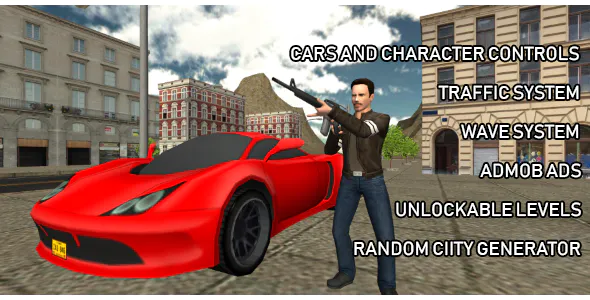
Crime Wars of San Andreas is an open world crime life simulator. You play as a cool gangster of big criminal organization. Your task is to defeat the gangsters of other bands and clear the city from the mafia. In this game, you can go where you want, drive on any car you like and make a real chaos on the streets. Using the minimaps you can find weapons and useful items that help you to reach the goal or just have fun.Initially, there are 6 districts in the game, in each of which you need to restore order. In each district you will have at your disposal one of the cool cars and a unique gun for the massacre of bad guys.
Features:
• Different weapons such as pistol, shotgun and rocket launcher
• Tons of cars to control: sport car, taxi, bus, firetruck and others
• Wave System (random enemy settings)
• Traffic system (traffic vehicles AI and pedestrians AI)
• Random city generator (1 click = new city)
• Menu with unlockable levels
• Admob Ads integrated
o use this project you need to install Unity 2019.2.17f (or newer version) from Unity Hub.
Setup Admob for Android
1) On Admob site create new Android app with interstitial and banner ad unit ids.
2) In Unity top menu go to Assets – Google Mobile Ads – Settings. Under Admob Ad Id label put your App Id from Admob website for Android.
3) Open /Assets/GAME/Scripts/GameUI.cs script. At line 15 put your Banner Ad Id from Admob website. At line 16 put your Interstitial Ad Id from Admob website.
Setup Admob for iOS
1) On Admob site create new iOS app with interstitial and banner ad unit ids.
2) In Unity top menu go to Assets – Google Mobile Ads – Settings. Under Admob Ad Id label put your App Id from Admob website for iOS.
3) Open /Assets/GAME/Scripts/GameUI.cs script. At line 18 put your Banner Ad Id from Admob website. At line 19 put your Interstitial Ad Id from Admob website.
You need to know Unity basics to make below steps. If you don’t know, just upload game to store as is.
- Before making a purchase, please read the Terms and Conditions on this page: Terms & Conditions
- If you have any questions, please first read the FAQ on this page: FAQ
- If you haven’t found the answer to your question, please contact us by e-mail codingshop20@yahoo.com or create ticket.
- Developer Support: Official support from the original developer is not included with purchases from CodingShop.
- Product Updates: Free lifetime updates are not included. Future updates is not free and should buy again.
- Download Access: Purchased products are available for download for 30 days after purchase. We recommend downloading and securely storing your files during this period.
- Security: We take reasonable measures to review the files available on our platform. Customers should also scan downloaded files with up-to-date security software before installation.
- All software products available on CodingShop are distributed under the GNU General Public License (GPL). The applicable license information is provided with each product where applicable. Please review the applicable GPL license terms before using, modifying or redistributing any product.
- CodingShop is an independent digital marketplace and is not the original developer or official distributor of third-party products unless explicitly stated. We do not provide or sell purchase codes, activation codes, license keys.
- You can download the product after the purchase by a direct link on your account page in the downloads section.
Related Products

ChitChat – Material WhatsApp UI Template

Android Ecommerce – Universal Android Ecommerce / Store Full Mobile App with Laravel CMS

AXSPASS – GatePass Android App

My Kitchen | Recipe Cookbook native android application based on WordPress

CiyaShop Native Android Application based on WooCommerce 5.14