
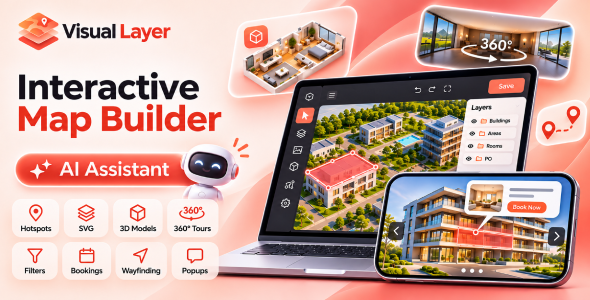
Visual Layer Map – Interactive Maps, Floor Plans, 3D Models, 360° Tours SVG Map Builder

Version Download:
Original price was: $39.00.$6.00Current price is: $6.00.
Turn ordinary images into interactive experiences.
Have a floor plan, building image, product photo, or 3D model that you want visitors to explore?
Visual Layer helps you turn static visuals into interactive maps without having to build everything from scratch. Add clickable areas, show information in popups, connect rooms through 360° virtual tours, or let visitors find and book what they’re looking for.
Whether you’re creating a real estate property map, a hotel floor plan, a virtual showroom, or an interactive product presentation, Visual Layer gives you the tools to build it visually.
Build Your Map Visually
You don’t need to manually calculate coordinates or write code to make an image interactive.
Upload an image and start adding hotspots using polygons, rectangles, circles, or pins. For more complex shapes, use the magnetic lasso and magic wand to follow edges and select areas more accurately.
Organize your elements into layers, group related objects, adjust their appearance, and preview your changes as you work.
Let AI Help With the Work
Creating dozens of hotspots by hand can take time, especially when working with detailed floor plans or large images.
Visual Layer includes an AI assistant that can analyze your picture, identify areas, draw outlines, name elements, and prepare popups based on your instructions.
Describe what you want in everyday language, review the results, and make changes whenever needed. You remain in control of what gets published.
Go Beyond Simple Image Hotspots
An interactive map should do more than respond to clicks.
With Visual Layer, you can:
Create interactive floor plans – Make rooms, apartments, offices, and building sections clickable.
Build 360° virtual tours – Connect panoramic scenes and let visitors explore spaces naturally.
Work with 3D models – Upload 3D scenes and add interactions to individual parts.
Design rich popups – Combine images, videos, text, galleries, forms, and other content.
Add search and filters – Help visitors find specific properties, rooms, products, or locations.
Show availability – Use different colors and statuses to distinguish available, reserved, or sold units.
Enable bookings – Allow visitors to reserve rooms, appointments, or other bookable spaces.
Create indoor directions – Guide visitors between locations, including across multiple floors.
Track engagement – Understand which areas visitors explore using statistics and heatmaps.
- Before making a purchase, please read the Terms and Conditions on this page: Terms & Conditions
- If you have any questions, please first read the FAQ on this page: FAQ
- If you haven’t found the answer to your question, please contact us by e-mail codingshop20@yahoo.com or create ticket.
- Developer Support: Official support from the original developer is not included with purchases from CodingShop.
- Product Updates: Free lifetime updates are not included. Future updates is not free and should buy again.
- Download Access: Purchased products are available for download for 30 days after purchase. We recommend downloading and securely storing your files during this period.
- Security: We take reasonable measures to review the files available on our platform. Customers should also scan downloaded files with up-to-date security software before installation.
- All software products available on CodingShop are distributed under the GNU General Public License (GPL). The applicable license information is provided with each product where applicable. Please review the applicable GPL license terms before using, modifying or redistributing any product.
- CodingShop is an independent digital marketplace and is not the original developer or official distributor of third-party products unless explicitly stated. We do not provide or sell purchase codes, activation codes, license keys.
- You can download the product after the purchase by a direct link on your account page in the downloads section.
Related Products
Ekattor 8 School Management System 2.0

Laravel Form – HTML Form Generator – Admin Template

Ekattor 8 Online School Addon Bundle

HR Records plugin for RISE CRM

BMCleaner Pro – Full Application Source Code