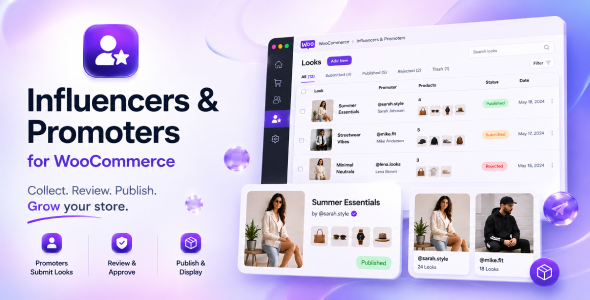
Influencers and Promoters for WooCommerce

Version Download:
Original price was: $59.00.$9.00Current price is: $9.00.
Let promoters and influencers submit product looks, then review, publish, and display that content in your WooCommerce store.
Description
Influencers and Promoters is a WooCommerce extension for stores that want to collect and manage promotional product content from trusted users.
The plugin adds a Promoter role, a front-end submission workflow, a WooCommerce admin screen for reviewing submitted looks, and display blocks for promoter profiles and promoter looks. Promoters can submit a title, description, product selections, and image gallery. Store managers can review submissions, publish or reject them, and optionally create grouped WooCommerce products from approved looks.
Use it to support influencer campaigns, community styling, product bundles, user-generated galleries, and curated product recommendations.
= Main Features =
- Adds a dedicated Promoter user role.
- Adds a Looks area to the WooCommerce My Account screen.
- Allows promoters to submit looks with images and selected products.
- Lets administrators and shop managers review, edit, approve, reject, trash, restore, and delete looks.
- Can create grouped WooCommerce products when looks are published.
- Includes product and gallery data for each look.
- Includes blocks for promoter looks and promoter profiles.
- Supports optional public promoter profile pages.
- Includes configurable limits for submitted looks, published looks, products per look, images per look, file size, and image dimensions.
- Includes optional demo data tools for testing the workflow.
= Admin Workflow =
After activation, manage the plugin from WooCommerce > Influencers and Promoters.
From the admin screen you can:
- Review submitted looks.
- Edit look title, description, gallery, and promoted products.
- Publish or reject looks.
- Restore rejected or trashed looks.
- Create missing grouped products.
- Manage promoter status.
- Invite promoters by email.
- Add the Promoter role to existing users.
= Promoter Workflow =
Promoters can use the Looks section in their WooCommerce My Account area to submit new looks and view their existing submissions.
A submitted look can include:
- A title.
- A description.
- One or more images.
- Selected WooCommerce products.
Submission limits are controlled from the plugin settings.
= Blocks =
The plugin registers blocks for displaying promoter content:
- Promoter Profile
- Promoter Looks
These blocks can be used in block templates, pages, and other block-enabled areas where supported by your theme.
= Settings =
Settings are available under WooCommerce > Settings > Influencers and Promoters.
Available settings include:
- Maximum published looks per promoter.
- Maximum submitted looks per promoter.
- Maximum selected products per look.
- Maximum images per look.
- Maximum upload image file size.
- Maximum image width.
- Maximum image height.
- Create grouped product on look publication.
- Enable demo mode.
- Enable promoter profile pages.
- Before making a purchase, please read the Terms and Conditions on this page: Terms & Conditions
- If you have any questions, please first read the FAQ on this page: FAQ
- If you haven’t found the answer to your question, please contact us by e-mail codingshop20@yahoo.com or create ticket.
- Please note that any digital products presented on the website do not contain malicious code, viruses or advertising. You buy the original files from the developers. We do not sell any products downloaded from other sites.
- we have not responsible for support users. if you need support, you can buy products directly from envato.
- Note that we can NOT provide purchase code for you. all products is Non-Licensed.
- we can NOT support free updates for you. download links available until 30 days after purchase.
- You can download the product after the purchase by a direct link on your account page in the downloads section.
Related Products
JNews – WordPress Newspaper Magazine Blog AMP Theme 11.5.2

iBid – Multi Vendor Auctions WooCommerce Theme 4.0.1