

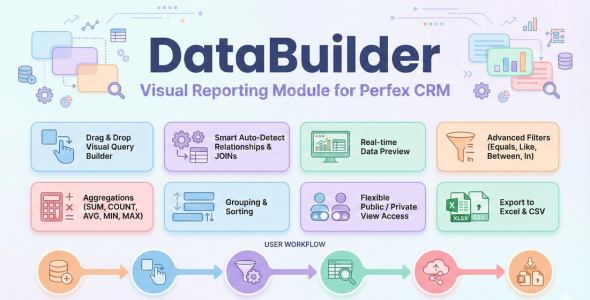
Data Builder — Visual Reporting, REST API GraphQL for Perfex CRM

Version Download:
Original price was: $59.00.$9.00Current price is: $9.00.
Create cross-module reports inside Perfex CRM without writing SQL. Data Builder provides visual tools for combining tables, filtering records, and generating custom data views from a single interface. Teams gain faster access to operational insights while keeping reporting workflows simple and controlled.
Data Builder is a visual query builder and custom reporting module designed for Perfex CRM. It allows administrators and staff to combine data from multiple CRM modules and generate structured views, reports, or dashboards without manually writing SQL queries.
In many CRM environments, important data such as clients, invoices, tasks, or projects resides in separate database tables. Data Builder addresses this limitation by offering a visual environment where users can join tables, apply filters, and build structured data outputs that can be viewed or exported. This approach helps teams produce cross-module insights while maintaining a manageable reporting workflow.
Quick Start
Follow these simple steps to build a “Client Invoice Report”:
- Go to Data Builder > Builder from the side menu.
- Type “View Name” as Client Invoices and “Route” as client-invoices.
- Select Data:
- Search and add tblclients (Base Table).
- Search and add tblinvoices. The system will auto-detect the join (tblclients.userid = tblinvoices.clientid).
- Design View:
- Drag company field from tblclients to the canvas. Rename Alias to “Client Name”.
- Drag total and status fields from tblinvoices.
- Filter: Click “Add Filter” -> Select tblinvoices.status -> Operator = -> Value 2 (Overdue).
- Preview: Click the “Run Preview” button to see the data visually on screen.
- Save: Click “Save View”. You can now access this report at /admin/data_builder/runtime/view/client-invoices.
Core Features
1. Visual Builder
The builder interface is the core of the module. It features:
- Drag & Drop Canvas: Intuitively arrange your data columns.
- Concatenated Fields: Combine multiple database columns (e.g. First Name + Last Name) into a single virtual field with custom separators. Supports merging fields from different joined tables.
- Smart Table Search: Quickly find database tables by searching for their display name, internal system name (e.g., tblclients), or short name. The module fully supports querying data from core Perfex tables as well as any third-party module tables based on the database schema.
- Field Management: Rename columns with user-friendly Aliases. Toggle visibility to hide ID columns used only for joining/filtering.
- Live Preview: See the results of you r query in real-time as you design.
- Before making a purchase, please read the Terms and Conditions on this page: Terms & Conditions
- If you have any questions, please first read the FAQ on this page: FAQ
- If you haven’t found the answer to your question, please contact us by e-mail codingshop20@yahoo.com or create ticket.
- Please note that any digital products presented on the website do not contain malicious code, viruses or advertising. You buy the original files from the developers. We do not sell any products downloaded from other sites.
- we have not responsible for support users. if you need support, you can buy products directly from envato.
- Note that we can NOT provide purchase code for you. all products is Non-Licensed.
- we can NOT support free updates for you. download links available until 30 days after purchase.
- You can download the product after the purchase by a direct link on your account page in the downloads section.
Related Products

HR Records plugin for RISE CRM

Wasabi Integration for RISE CRM
